Stage combines live transcription, interpretation, voice output and audience questions in one web application. It uses modern browser capabilities including microphone input, so a speaker can start talking without special hardware while the audience follows through a link or QR code. Organizers keep control of the flow, languages, audience engagement and real event consumption.
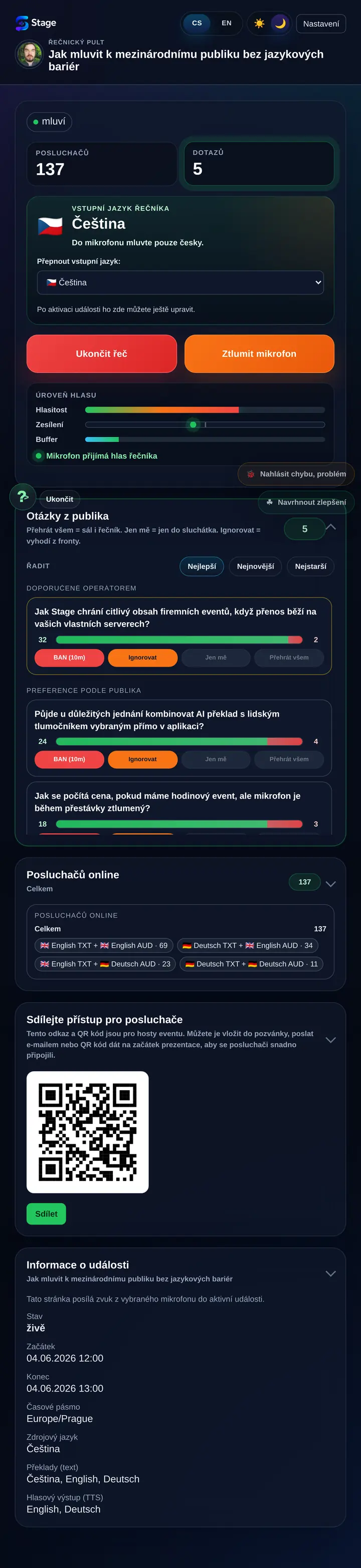
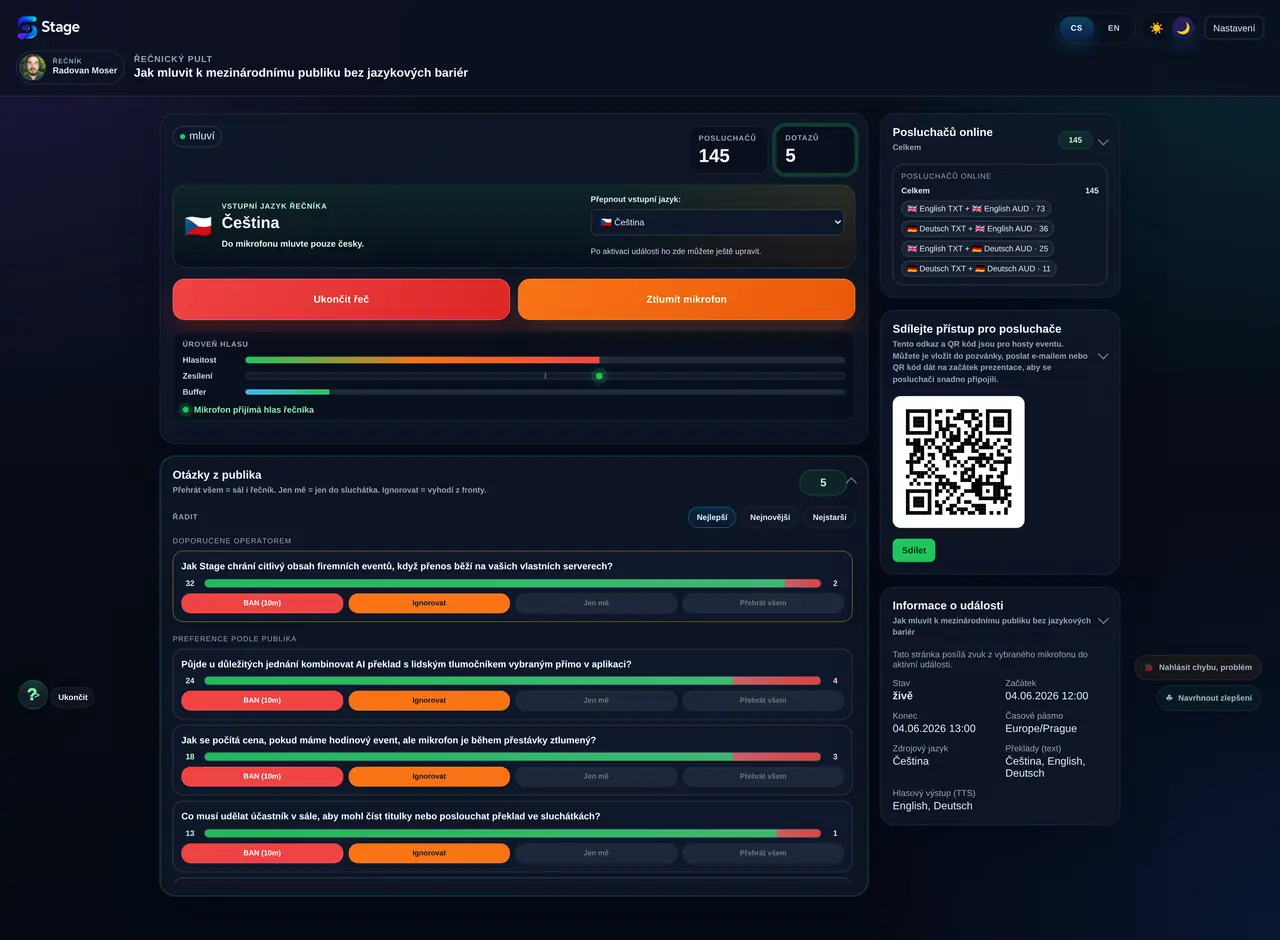
The speaker console shows microphone status, audience count, incoming questions and technical event details. The speaker does not need to manage who is listening in which language, whether the audience has the right receiver or where subtitles are coming from.
What matters is natural speaking. Stage builds supporting layers around that speech: text, interpretation, voice output, audience access and a place for questions.
The audience chooses its own format
Each attendee can read subtitles, follow the interpretation, turn on audio or submit a question. A phone, browser and link or QR code are enough.
Every listener chooses a language and a way of following the event. One person can read English text, another can listen to audio output and another can focus only on questions and answers.
The organizer sees the real operation
Administration helps track the event flow, languages, listeners and real costs. It makes sense to pay for actual use, not for empty reserved time.
After the event, the organizer can review when people were really listening, how audience numbers changed and how the operation translated into the budget.
Why Stage exists
A language barrier should not decide the value of an event.
Companies, conferences, trainings, workshops and business presentations often depend on one moment: someone speaks and others need to understand immediately. Stage is built for exactly that live communication flow. It is not only automated interpretation, but a full environment for the speaker, the audience, the moderator, the production team and the organizer.
An event becomes valuable only when the audience understands, can react and the organizer has a tool that works without long technical preparation. Stage therefore combines simple audience access with a more professional control layer for the team running the event.
In practice that means one system can cover subtitles, interpretation, listening, questions, moderation and basic operational reporting. Stage replaces several improvised tools that usually do not work well together.
Specialist events depend on terminology. Stage can therefore use domain glossaries where the organizer prepares the correct meaning of terms, abbreviations, product names or names. Translation is then not only a general language conversion; it follows the context of the specific talk or field.
The main approach remains web-based because it is the fastest option for the audience. For speakers who use Stage repeatedly, we are also preparing mobile apps for Android and iPhone to make microphone input and event control even easier.
1
Create the event
The organizer sets the speaker language, target languages, audience questions and attendee access. The event can be prepared for a small group or a larger audience.
2
The speaker talks
Stage receives speech from the microphone, converts it to text in real time and sends it to the rest of the system. The speaker can see whether the microphone is live and whether the audience is actually listening.
3
AI interprets
The content is converted into selected languages and can also generate voice output depending on the setup. AI is not used as decoration here, but as a practical way to make spoken content accessible quickly.
4
A domain glossary is applied
Prepared terminology helps translations respect specialist terms, abbreviations and names across target languages.
5
The audience reacts
Participants follow the interpretation, listen, vote on questions and join without installing an app. The moderator or speaker can then work with the questions that matter most to the audience.
Interface examples
Walk through Stage as a live event.
These examples are long screenshots placed inside scrollable frames. Move them with your finger, mouse wheel or touchpad.
Speaker console on mobile
The speaker sees the microphone, audience and questions.
The mobile console is designed for situations where the speaker does not want to stand behind a laptop. The phone can become a simple control point showing event status, microphone activity, listener count, question count, audience voting and practical join links.
This mode works well for smaller talks, trainings, tours, showrooms or situations where the speaker is moving around. Important information stays visible and the audience can join in without interrupting the flow of the presentation.
The console also builds trust that the event is really live: the speaker sees microphone activity, audience engagement and questions that already have support from other attendees.
Scroll the example
Listener view on mobile
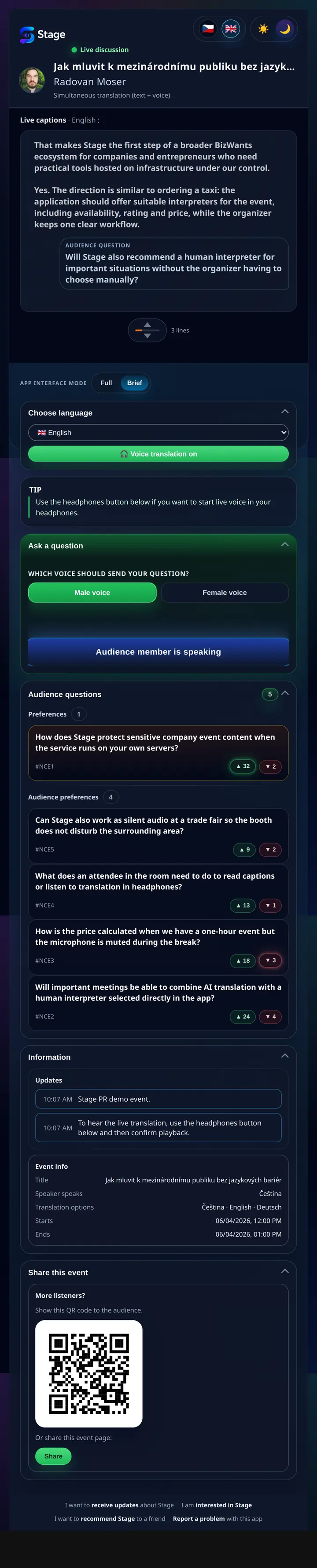
The phone becomes a personal interpretation receiver.
The listener follows the interpretation, turns on audio and can join the discussion. Stage helps even people who would otherwise stay silent because of language barriers or hesitation. The important part is that the audience does not install another app. It simply opens a web page from a link or QR code.
The mobile layout is built for quick decisions: choose a language, read the live text, turn on sound and respond with a question if needed. In a multilingual event, each attendee gets a personal channel without changing the experience for others.
Inside the discussion area, participants can follow not only subtitles but also audience questions and speaker answers. Voting helps surface topics that matter to more people, so the moderator does not rely only on random raised hands in the room.
Scroll the example
Desktop for speakers and production
When the speaker uses a laptop and Bluetooth headset.
The desktop view shows Stage as a real production tool. It fits a moderator, a speaker at a notebook or technical support during the event. One screen can show microphone status, audience presence, questions, a QR code and the information people need to join quickly.
For the organizer, the key is not having to guess. They can see whether the audience is growing, which languages are active and which questions are becoming important for the room. That pushes Stage beyond a simple interpreter into a practical live communication control interface.
Scroll the example
Listener on desktop
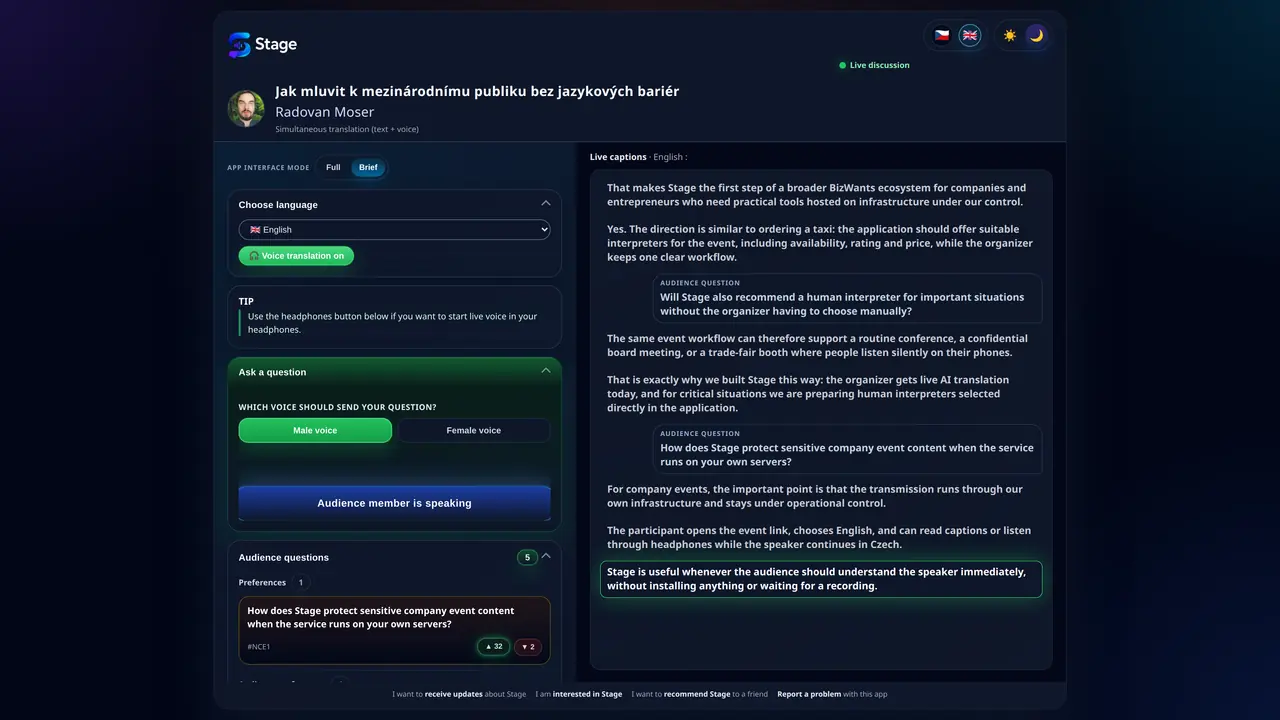
Transcription, interpretation, speaker answers and audience questions in one stream.
Stage is not only a subtitle window. The audience sees the context of the discussion, can vote on questions and follow speaker answers as the event unfolds. This matters especially when a presentation turns into a debate and the exchange between speaker and audience speeds up.
The desktop listener view works well for notebook users, hybrid audiences or people who want text and questions side by side. In practice, Stage supports not only interpretation, but also better orientation in what is happening right now.
Scroll the example
Event administration
Organizers need to see both the flow and the economics.
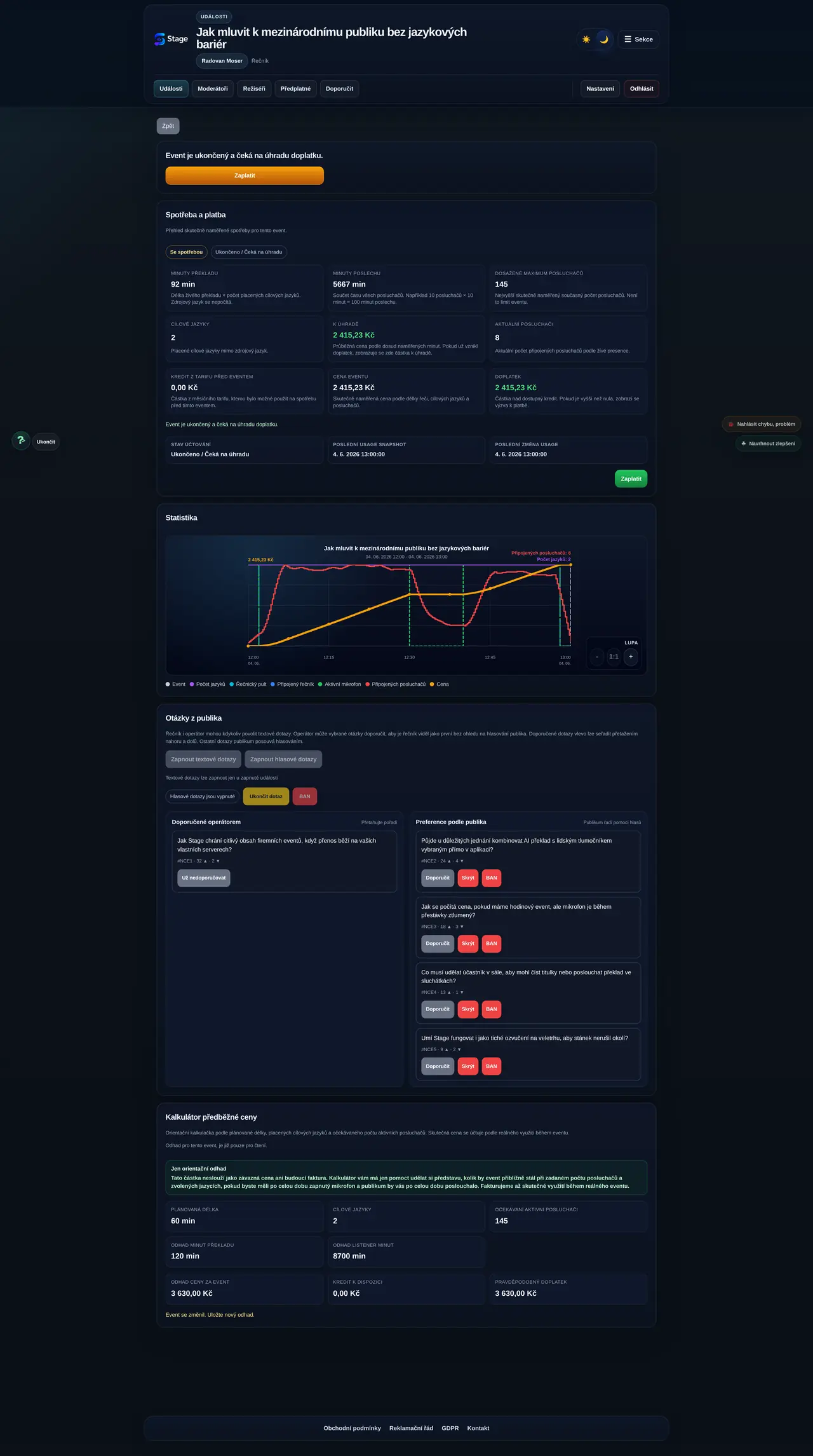
After the event ends, it is important to know when people were listening, which languages were active and how real consumption affected the price. That is the basis of a fair operating model: cost should match what was actually used.
The chart helps explain the event afterwards. You can see audience growth after the speech starts, a break, a return of listeners and the final drop. Next to that, the organizer can follow the price curve, which should flatten whenever the service is not actually running.
Scroll the example
Where Stage fits
See where Stage helps in practice.
Stage can be used for conferences, trainings, workshops, silent audio, trade fairs, hybrid events, tours and smaller company presentations. This page explains the product principle and shows the interface; we keep the overview of specific scenarios on a separate page so it can grow with new experience and features.
Stage is a Czech project by BizWants. The company is based in Prague, its sole owner comes from Ceske Budejovice and the first infrastructure was also built in South Bohemia. Running our own environment gives us control over how the system is developed, operated and protected.
For business customers this matters because presentations, internal information, commercial strategy, technical details or other reputation-sensitive content can flow through the system. That is why we do not want Stage to be an anonymous layer on top of somebody else's tool, but a service with its own operational responsibility.
Security is part of the architecture from the start: separated environments, our own server infrastructure, control over data flows and an operating model designed for business use. Stage is the first application in the BizWants ecosystem, which will gradually bring more practical tools for companies and entrepreneurs.
AI as the current core of the product
Today we build on AI for transcription, interpretation and voice output so content can be made accessible even where classic interpreting would be too difficult or too expensive to organize. For us, AI is a practical tool, not a label.
Human interpreters for important situations
In the future we plan to let customers select a human interpreter directly for an event. The system will offer suitable people by availability, rating, specialization and price, similar to how other services match a ride.
The beginning of the BizWants ecosystem
Stage is the first application in a broader ecosystem of tools for companies and entrepreneurs. The goal is to build practical software that solves real operational needs: communication, business, organization, operations and working with information.
Try Stage on your own event
Registration is free. Create your first event, test the full workflow, and decide based on your own experience.
We occasionally send practical updates about the app, operations, and live-event features. You can unsubscribe at any time.
Cookies and settings
We use necessary cookies and local storage for sign-in, security, language, theme and listener-page operation. We do not currently use optional tracking.